🌐sjcc.ed.ph ✉ admin@sjcc.edu.ph 🕿 (046) 341-1937 f SJC Cavite City

Online Application Procedure
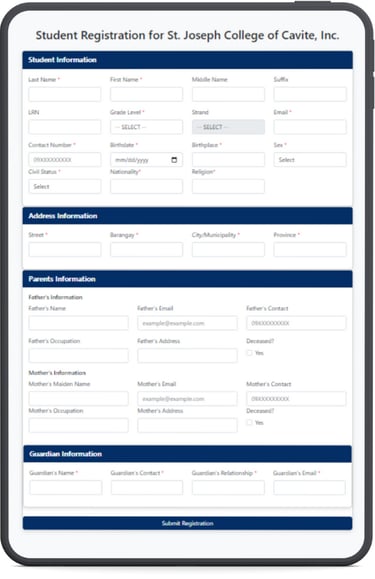
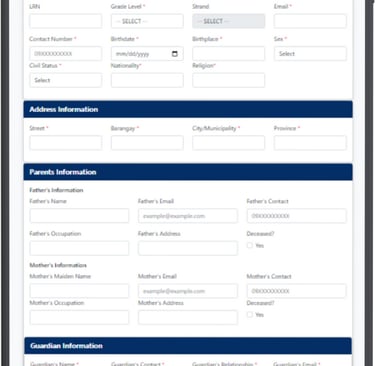
Fill in Student Information
Complete the registration form with your details:Review All Entries Carefully
Make sure all information is correct and spelled properly before proceeding — correct data helps avoid registration issues later.Submit the Form
After filling out all required fields, click the Submit Registration button to send your application.Wait for Confirmation
After submitting, the school’s admissions or registrar office will usually review your application. The schools will contact you via the email or phone number you provided with next steps, orientation details, or enrollment confirmation.
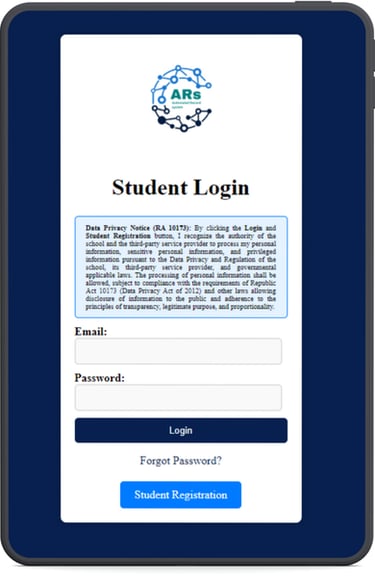
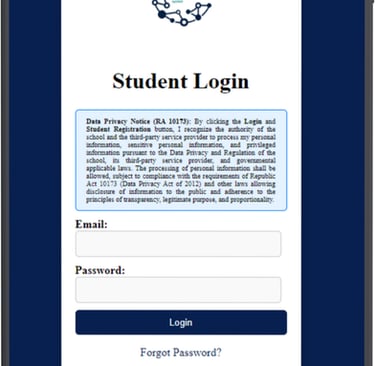
Student Registration Process - New and Transferee Students
Open the Website
Go to https://www.arschools.app/ in your web browser or scan the QR below.
Click “Student Registration”
On the homepage, you’ll see a Student Login form and a button or link that says “Student Registration.” Click that link to start a new application.

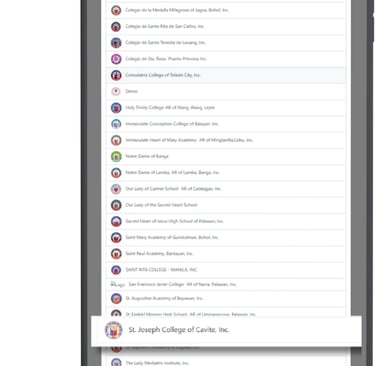
Select Your School
On the Student Registration page, you’ll see a list of available schools participating in the ARSchools system. Scroll and choose "St. Joseph College of Cavite, Inc.".



🕿 (046) 341-1937
Copyright © 2025. All rights reserved.
Connect with us today.

St. Joseph College of Cavite, Inc. offers complete basic education programs with a focus on academic excellence and character formation. Guided by committed educators, we shape future-ready learners. Now accepting enrollees for SY 2026–2027.
St. Joseph College of Cavite, Inc.
⚲ Plaridel Steet, San Roque, Cavite, Philippines, 4100
✉ admin@sjcc.edu.ph
f SJC Cavite City